
3D Load Packer1.93 - Download
You'll be able to download in few seconds.
Publisher Description
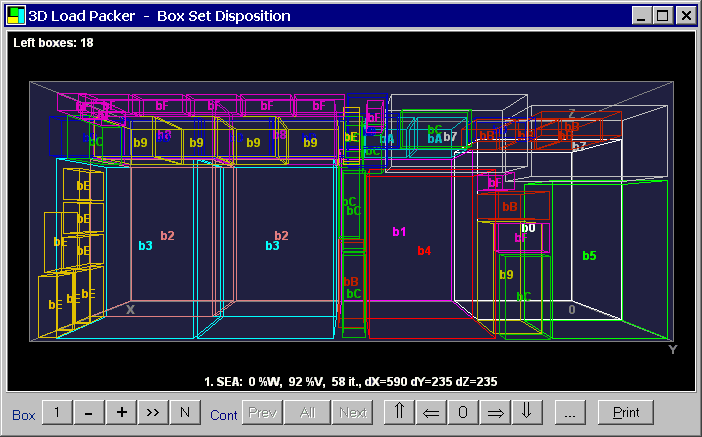
3D Load Packer (3DLP) is the unique space optimizer designed to help you plan quickly and easily the best compact arrangement of a number of different size 3D rectangular objects (hereafter called "Boxes") within one or more rectangular enclosures (hereafter "Containers"). 3DLP is based on the truly three-dimensional, most dense and quick original packing algorithms.
The program may be used to optimize multi-product load plans for any rectangular containers, trucks, trailers, railcars, crates, pallets and boxes, as well as be applied to any other 3D-space optimization problem.
3D Load Packer can optimize over multiple containers in multiple sizes at the same time, taking into account overall box set considered and allowed box space orientations, specified for each box separately or for all boxes together.
An overall load weight limit and truck axle weight limits may be taken into account as additional constraints or actual optimization factors. Full control on the allowed box overhang is also available.
The program has a facility for specifying the associated cost for each box / container item in order to calculate totals and affect upon optimization as additional priority factors. Optimizer goal and other main settings are adjustable.
Typically, optimizer reduces volume waste by a factor of 1.5 - 2 with respect to manual load planning.
About 3D Load Packer
This program is available in English, French, Italian, Spanish. It was last updated on 29 September, 2026. 3D Load Packer is compatible with the following operating systems: Other, Windows.
The company that develops 3D Load Packer is Astrokettle Algorithms. The latest version released by its developer is 1.93.
The download we have available for 3D Load Packer has a file size of 4.2 MB. Just click the green Download button above to start the downloading process. The program is listed on our website since 2013-02-12 and was downloaded 0 times. We have already checked if the download link is safe, however for your own protection we recommend that you scan the downloaded software with your antivirus. Your antivirus may detect the 3D Load Packer as malware if the download link is broken.
How to install 3D Load Packer on your Windows device:
- Click on the Download button on our website. This will start the download from the website of the developer.
- Once the 3D Load Packer is downloaded click on it to start the setup process (assuming you are on a desktop computer).
- When the installation is finished you should be able to see and run the program.
Program Details
General
System requirements
Download information
Pricing
Version History
version 1.93
posted on 2013-02-12
Html Help, Spanish language, Box Binding etc.
version 1.8
posted on 2006-12-12
French and Italian interface, box data import, solution export into *.csv file format, etc.
Disclaimer
External Download
We do not host 3D Load Packer on our servers. We did not scan it for viruses, adware, spyware or other type of malware. This app is hosted by the software publisher and passed their terms and conditions to be listed there. We recommend caution when installing it.
The external download link for 3D Load Packer is provided to you by apps112.com without any warranties, representations or guarantees of any kind, so access it at your own risk.
If you have questions regarding this particular app contact the publisher directly. For questions about the functionalities of apps112.com contact us.
